Trade crypto with funded capital
ExploreDXtrade is the platform Velotrade runs on. It is an institutional-grade, browser-based trading environment built by Devexperts and used by professional prop firms globally. If you are starting a Velotrade challenge, understanding DXtrade is not optional, the platform is where every trade, every drawdown calculation, and every payout originates.
This guide covers everything a prop trader needs to get comfortable fast: setup, interface, order types, drawdown monitoring, EA integration, and the specific settings that matter most when trading under funded account rules.
Highlights of this article
- DXtrade is browser-based with no download required: open it with DXTRADE WEB from the Velotrade Portal
- The platform displays real-time equity, daily P&L, and drawdown metrics directly in the account panel
- Order types include market, limit and stop orders, with Stop Loss and Take Profit protection. Stop-limit orders are disabled on Velotrade
- EAs and API integration are supported, but all automated strategies must comply with Velotrade's rule set
- Prop traders should configure DXtrade's workspace around risk visibility, not charting aesthetics
What Is DXtrade?
DXtrade is a multi-asset trading platform built by Devexperts, a financial technology firm with clients across institutional brokerage, prime services, and proprietary trading. It was built as an alternative to aging retail platforms like MT4 and MT5, with a cleaner interface, a more reliable execution layer, and native support for modern asset classes including crypto perpetuals. For a full overview of the platform and why prop firms moved to it, see what is DXtrade.
Several professional prop firms have moved to DXtrade specifically because of its account-level risk controls and real-time metric visibility. For a prop trader, these are not cosmetic features. The ability to monitor your drawdown floor and daily loss against live equity in one panel is directly relevant to challenge execution.
DXtrade runs in a modern browser. There is no download or installation: you open it with DXTRADE WEB from the Velotrade Portal. Use a DXtrade mobile app only if Velotrade has confirmed it for your account. If you are unsure, open DXtrade using DXTRADE WEB from the Velotrade Portal.
Getting Set Up on DXtrade via Velotrade
After purchasing a challenge at velotrade.com/challenges, you sign in to the Velotrade Portal with the email address you registered and the password you set. Your DXtrade login is separate: Velotrade generates a DXtrade username and password for each Challenge account, and you find them inside the Portal.
Steps to get started:
- Open the Portal link from your Velotrade welcome email and sign in
- Choose My Accounts under Challenges, then select Dashboard on the account card to review its details
- On the same card, select Start Trading to view the DXtrade username and password, then choose DXTRADE WEB to open the platform
- Sign in to DXtrade and check that the account number in the upper-right account selector matches the Challenge in the Portal
- Review your account balance, equity, and current drawdown parameters before placing any trade
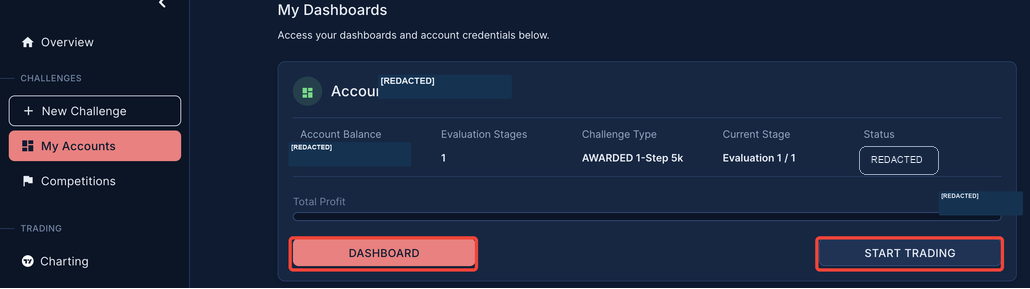
For the full first-session walkthrough with screenshots of every step, see the Velotrade Challenge account onboarding guide.
If you are running multiple Velotrade accounts, for example, a 2-step and a 1-step challenge, each account appears separately in the account selector. Trades on one account do not affect the drawdown or metrics of another.
For the full breakdown of what the challenge rules require before placing your first trade, read crypto prop firm rules and drawdowns explained.
Platform Overview: Key Areas
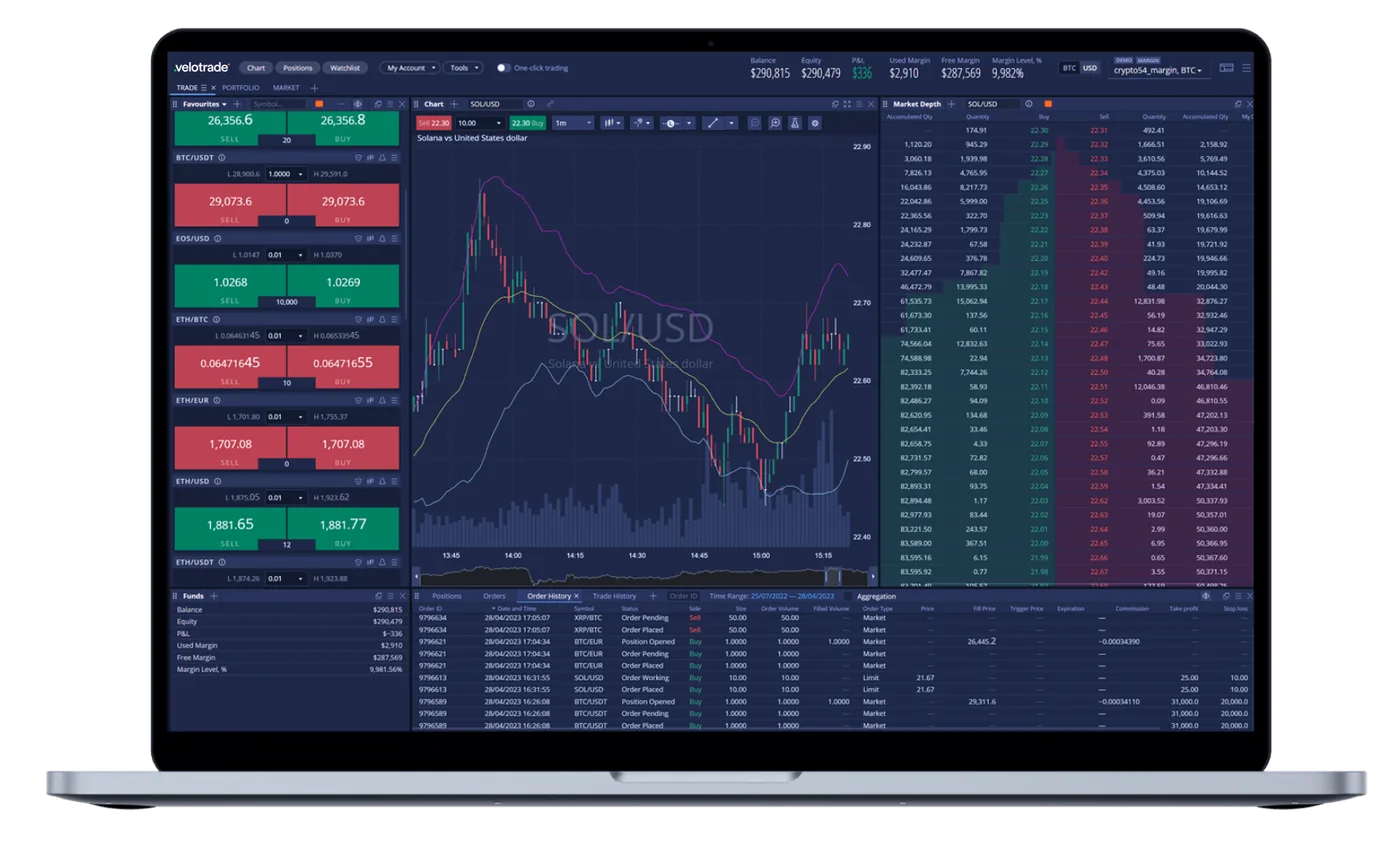
DXtrade is organized into 4 core areas. Understanding each one before starting a challenge saves time that would otherwise be spent navigating under pressure.
Charts Panel
The main trading view. DXtrade integrates professional-grade charting with support for standard technical analysis tools, trend lines, indicators, candlestick and bar chart formats (useful for reading candlestick patterns), and multi-timeframe switching, enough to map a Wyckoff accumulation range or any structural read. You can open multiple chart windows simultaneously and resize them to fit your workflow.
Crypto perpetual pairs including BTC/USD, ETH/USD, and the other instruments available on Velotrade are accessible from the instrument search in the charts panel. Switch between pairs directly from the chart header without navigating away.
Order Ticket
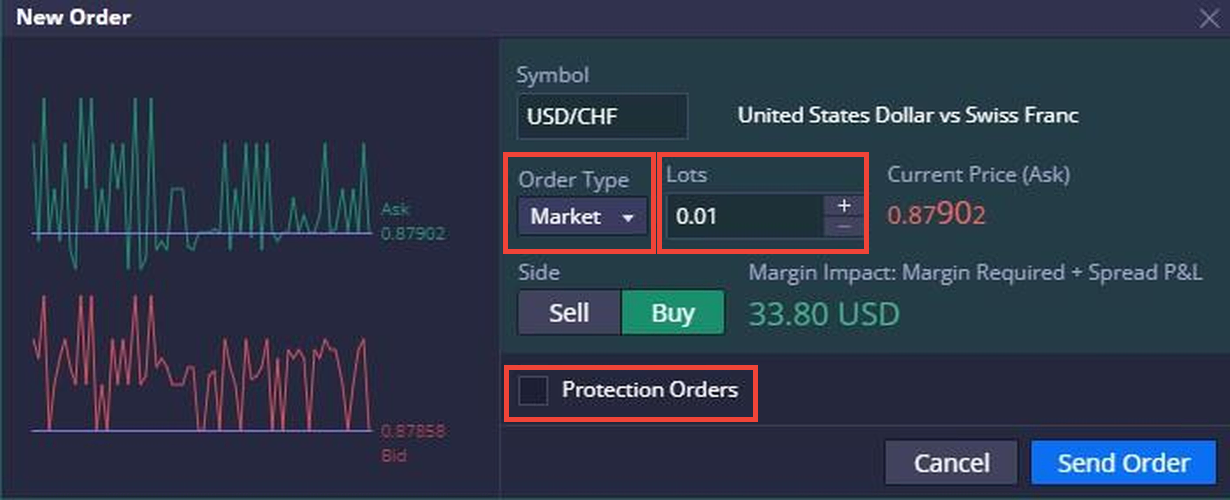
The order entry interface. Available from the chart panel or from the positions panel below. Displays the current bid/ask spread, lets you select order type and quantity, set stop-loss and take-profit levels, and review margin requirements before submission.
Order entry and modification are single-screen, no popups that require multiple confirmations for basic actions.
Positions and Orders Panel
All open positions, pending orders, and the history of closed trades appear here. Live P&L on each open position updates in real time. You can modify or close positions directly from this panel without returning to the chart.
The positions panel is where most active session management happens. Keeping it visible during a session reduces reaction time when managing against daily loss limits.
Account Metrics Panel
This is the most important panel for prop traders. It displays:
- Current equity, your account balance plus all unrealized P&L from open positions
- Daily P&L, profit or loss generated since the daily drawdown reset at 00:30 UTC
- Available margin, how much of your account remains free for new positions
- Drawdown floor, your maximum overall loss limit, fixed from your starting balance on Velotrade's static model
Check this panel before opening any new position. It is the live source of truth for where you stand against your challenge limits.
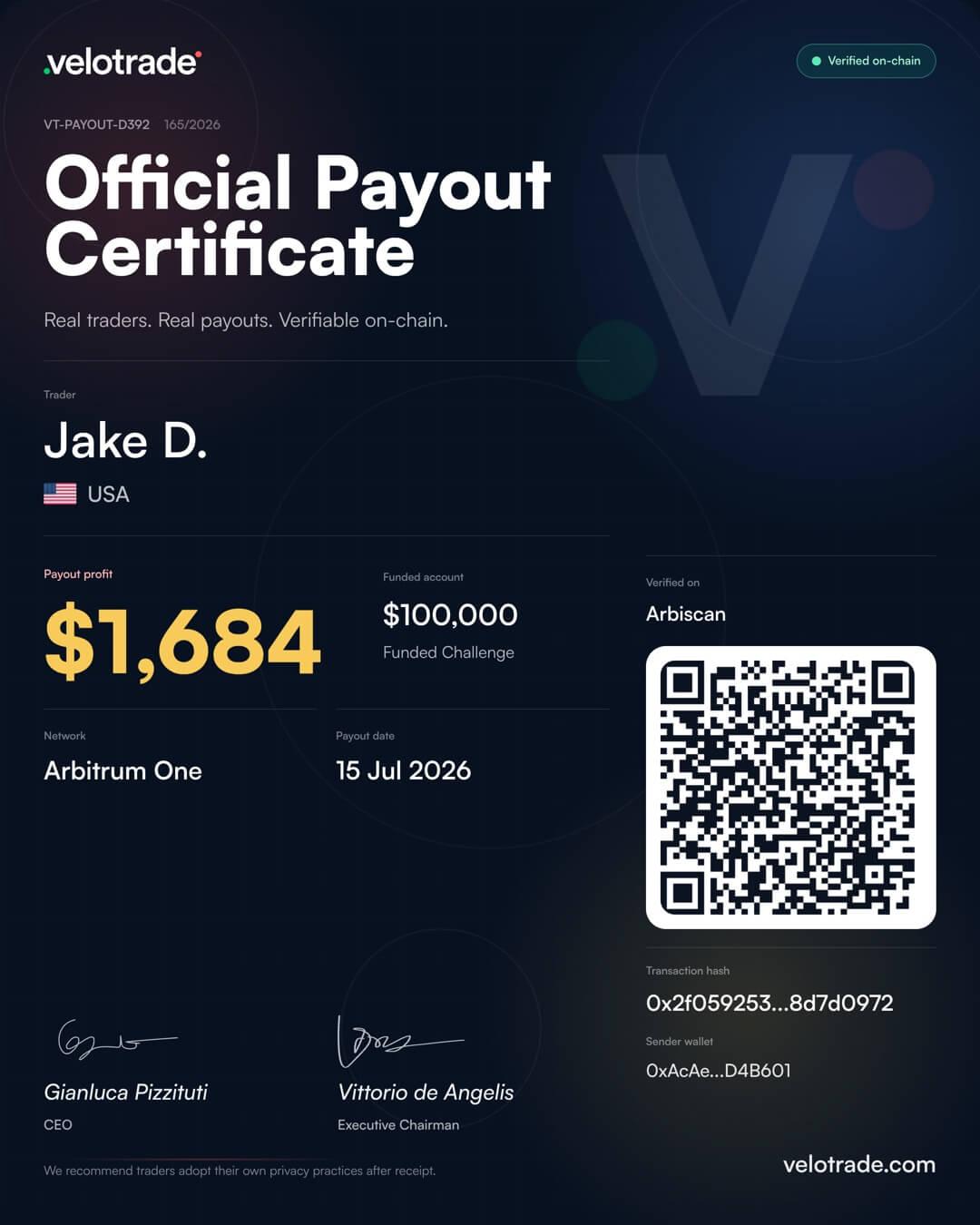
Payout proof
Fast, real payouts. Traceable on Arbitrum.
- Paid within 24 hours of approval
- Settled on Arbitrum in USDC or USDT
- Look up any transaction on Arbiscan

Order Types in DXtrade
DXtrade supports the standard order types a prop trader needs. Here is how each one applies in a crypto prop trading context.
Market Order
Executes immediately at the current market price. Best used when speed of entry matters more than price precision, news setups, breakout entries where you need to be in now. Slippage is possible during low-liquidity periods or high-volatility events, so account for spread cost in your position sizing.
Limit Order
Executes at your specified price or better. Used when you want precise entry control, for example, buying a pullback to a support level rather than chasing price. The order sits in the book until filled or cancelled.
Stop Order
Triggers a market order when price reaches your specified level. Used for breakout entries (buy stop above resistance, sell stop below support) or for setting stop-losses on open positions. On DXtrade, stop orders for risk management can be attached to positions directly at entry. The exact price your stop fills at depends on the platform's tick feed - see what funding ticks are for how tick precision affects stop execution and drawdown.
Stop-Limit Order (disabled on Velotrade)
A stop-limit order combines a stop trigger with a limit price, so it only fills at the limit price or better. Velotrade has disabled stop-limit orders, because a gap can pass the limit price without filling the order and leave a position open. A Stop Loss is different: when its trigger is reached it is sent as a market order intended to exit at the next available price, which can include slippage. The onboarding guide explains how Stop Loss and Take Profit behave.
For a clear explanation of how Velotrade's static drawdown floor behaves and why it differs from tick-by-tick trailing models used elsewhere, see EOD trailing vs tick-by-tick trailing drawdown explained.
Monitoring Your Drawdown and Account Metrics
This is where prop trading on DXtrade differs materially from retail trading. On a personal account, a bad day is just a bad day. On a challenge, a bad day can end the evaluation. The account metrics panel is not a reference tool, it is an active session monitor.
How Velotrade's Static Drawdown Works in Practice on DXtrade
Velotrade's challenges use static drawdown. The drawdown floor is fixed from your starting balance and never moves - not intraday, not at day close. The floor is set at 90% of the starting balance (2-Step Classic), 93% (1-Step Classic), or 97% (1-Step Pro), and never trails upward.
What this means inside DXtrade:
- Your equity can spike during a session without ever tightening your floor
- The floor is locked to your starting balance, so it does not move at day close either
- The floor never moves intraday, never moves at close, and never moves down
If you open DXtrade mid-session and your equity is temporarily above your starting balance, that unrealized gain does not change your drawdown floor - the floor stays exactly where it started. This is even more forgiving than tick-by-tick trailing drawdown used by other firms, where the same intraday spike would immediately reduce your available buffer. With static, you always know exactly where your limit sits.
Practical rule: before entering a new position, check your current equity against your drawdown floor in the account panel. If the gap between your equity and the floor is tighter than your intended position risk, reduce size or wait.
To model your exact drawdown floor and daily loss budget for your Velotrade account size, use the prop trading drawdown calculator.
Daily Loss Limit Reset
At 00:30 UTC, the daily loss limit resets, calculated from the higher of your balance or equity at that moment. This is the start of a new trading day for Velotrade's risk calculations. If you traded late into the night and want to continue into the next session, check that the daily counter has reset correctly before opening new positions.
Funded accounts
Ready to get funded?
Trade up to $200,000 in firm capital with static drawdown, no consistency rule, and payouts within 24 hours.
Start your Velotrade challengeCustomizing Your Workspace
DXtrade allows layout customization. The default layout works, but a few configuration changes improve session management significantly for prop trading.
Prioritize the account metrics panel. Move it to a visible position that you will check between every trade. Hiding it behind other panels defeats the purpose of having real-time drawdown data.
Set up a watchlist for your active pairs. If you trade BTC/USD and ETH/USD consistently, a dedicated watchlist with those pairs eliminates instrument search time during fast-moving markets.
Use multi-chart layouts for correlation monitoring. If your strategy involves watching related pairs (e.g., BTC and ETH together), a dual or quad chart layout keeps both visible without switching. DXtrade supports flexible grid layouts.
Save your layout. DXtrade preserves workspace layouts between sessions. Once you have configured a setup that works, save it. You should not be reconfiguring your workspace at the start of each session.

Trading on Mobile
Use a DXtrade mobile app only if Velotrade has confirmed it for your account. If you are unsure, open DXtrade using DXTRADE WEB from the Velotrade Portal.
For active intraday trading, a phone is a secondary screen: the smaller display limits how much you can monitor at once. Whatever device you use, confirm the selected account, check Positions and Orders, and keep an eye on your equity against your Challenge limits.
EA and API Integration on DXtrade
DXtrade supports algorithmic trading through its API. Expert advisors and automated systems can connect directly to execute orders, manage positions, and read account data programmatically. Velotrade has opened full API access to every account, challenge and funded, with no additional fee or approval process.
Velotrade permits EA and automated trading within defined parameters:
- Permitted: Automated strategies that execute valid market positions
- Not permitted: Latency arbitrage, tick scalping designed to exploit platform data feeds, coordinated multi-account manipulation
Before deploying any automated system on a Velotrade challenge, verify that its behavior complies with the full rules page. A system that passes backtesting but exploits platform simulation behavior will be flagged. The distinction is whether the strategy would work on a live exchange, if not, it is non-compliant.
For API setup, see the DXtrade API setup guide, which covers authentication, endpoints, and the place-order reference. The API supports REST and WebSocket connections for order submission, account data retrieval, and real-time position updates. Authentication uses your DXtrade account credentials.
If you run an EA that was built for MT4 or MT5, it cannot connect to DXtrade directly, the API is different. You will need a DXtrade-compatible adapter or to rebuild the logic using the DXtrade API. Allow time for testing before starting a funded challenge with any automated system.
Tips for Prop Traders on DXtrade
These are the operational habits that separate traders who get tripped up by platform mechanics from those who do not.
Know your daily reset time. Velotrade's daily P&L counter resets at 00:30 UTC. Plan session timing around this. Trading in the final minutes before reset with limited daily loss remaining creates unnecessary pressure.
Check metrics before every trade, not after. Looking at your equity and daily loss limit after you have already opened a position is reactive. Build the habit of checking the account panel before size is committed.
Use limit orders for planned setups. Market orders during volatile periods cost spread. For setups you have planned in advance, a breakout level, a support entry, a limit order gives you the fill you modeled in your risk calculation rather than a worse one.
Test your EA in demo first. DXtrade allows you to open a practice account before funding a challenge. Use it. An EA that behaves incorrectly under live conditions on your first day of a paid evaluation is an avoidable problem.
Understand what "equity" means in the context of your drawdown. Your account balance is what you close days at. Your equity is balance plus unrealized P&L. The drawdown floor on Velotrade is fixed from your starting balance, not live equity. This means temporary intraday dips do not move your floor, but they do affect your available margin in real time.
For a full practical guide on running a challenge from start to first payout without technical disqualifications, see how to pass a crypto prop challenge. For risk discipline principles that apply regardless of platform, see never get liquidated again in prop trading.
This guide reflects DXtrade's platform features as of April 2026. Platform interfaces are subject to update by Devexperts. Always verify current features and settings in your live DXtrade account. Velotrade challenge rules, pricing, and conditions should be confirmed at velotrade.com/challenges before purchasing.
Frequently Asked Questions
About the author

Vittorio De Angelis
Executive Chairman
Former equity-derivatives trader at JP Morgan, Dresdner Kleinwort and Bank of America in London. Later Head of Brokerage at a global broker in Hong Kong.
Velotrade was founded in Hong Kong in 2016 by a team from JP Morgan, Dresdner Kleinwort and Bank of America, has paid out over $2.5 billion to its trade-finance clients, and has been featured in Bloomberg, the Financial Times, the Wall Street Journal and on Nasdaq. Its prop trading evaluations are simulated and educational.
View author page